
Most ransomware plans are about stopping the attack. What decides how bad your month gets is whether you can restore, and how fast.
A question we get a lot from companies around Colombo is "which tool stops ransomware?" It's a fair question, but it's usually the wrong place to start. Tools help. What decides whether an incident costs you two days or three weeks is less exciting: whether your backups survive, whether anyone has practised restoring them, and whether the attacker could reach domain admin in the first place.
So this post is mostly about restores.
Can the same account delete your backups?
On internal tests this is one of the first things we look at. If the backup server is joined to the domain, and a domain admin can log in and delete the backup jobs or the repository, then so can an attacker who has become domain admin. Ransomware groups often go after backups before they encrypt anything, because it makes paying more likely.
What helps:
- At least one copy that is offline or immutable. A disconnected drive rotated weekly counts; it just needs someone to actually rotate it.
- Credentials for the backup system that aren't in Active Directory.
- An alert when backup jobs are deleted or retention is changed.
Have you restored anything this year?
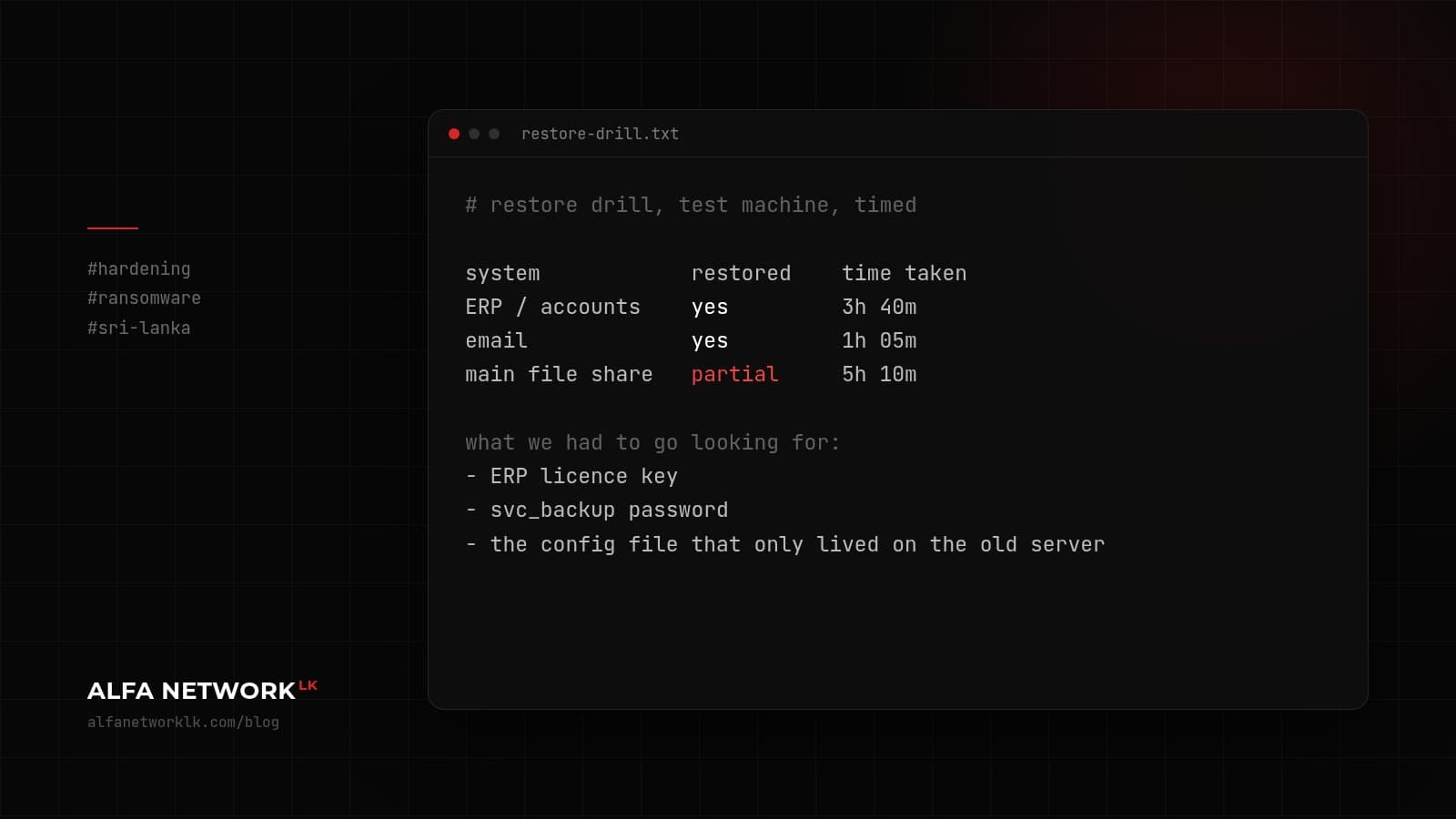
Not "the backup job shows green". An actual restore of a real system, timed.
On a recent internal lab exercise, the slow part of our own restore drill wasn't copying data. It was finding licence keys, service account passwords, and the one config file that only lived on the old server. That's normal. It's also exactly the stuff nobody can find at 2 a.m. during an incident.
Pick your most important systems (for most companies that means the ERP or accounting package, email, and the main file share) and restore each one to a test machine. Write down how long it took and what you had to go looking for.
The power cuts were a useful rehearsal
During the 2022 power cuts a lot of companies here found out their UPS lasted twenty minutes, their NAS didn't shut down cleanly, and the nightly backup hadn't run for a week. Ransomware readiness and plain business continuity overlap more than vendors like to admit. If your backups were shaky then, check them again now.
Then make it harder to spread
Once restores are sorted, look at how an attacker would move around:
- The same local admin password on every PC. Windows LAPS is built into current Windows versions and costs nothing.
- Staff who are local admins on their own laptops because one app needed it years ago.
- RDP open between every machine on the network.
- Service accounts with domain admin rights "just in case".
None of this needs a new product. It needs someone with the time to fix it.
Decide the awkward things early
Who is allowed to take the network offline? Who calls the bank? Who speaks to customers, and what do they say? If personal data may have been accessed, who looks at your obligations under the Personal Data Protection Act? Does anyone know how to report an incident to Sri Lanka CERT|CC?
Get management and IT around a table for two hours and walk through a scenario. It doesn't need to be fancy. Ours usually start with "it's Monday morning and the accounts team can't open any files."
What we'd do this month
- Confirm one backup copy can't be reached with domain credentials.
- Restore one important system to a spare machine and time it.
- Turn on Windows LAPS.
- Write a one-page incident contact list, print it, and keep a copy somewhere off the network.
That isn't everything. It's a better start than buying another tool.


Comments (0)
No public comments yet.